Know what's growing your store.
See where your paying customers come from and which ads actually pay off, then ask your AI assistant what to do next.
14 days free. No card.
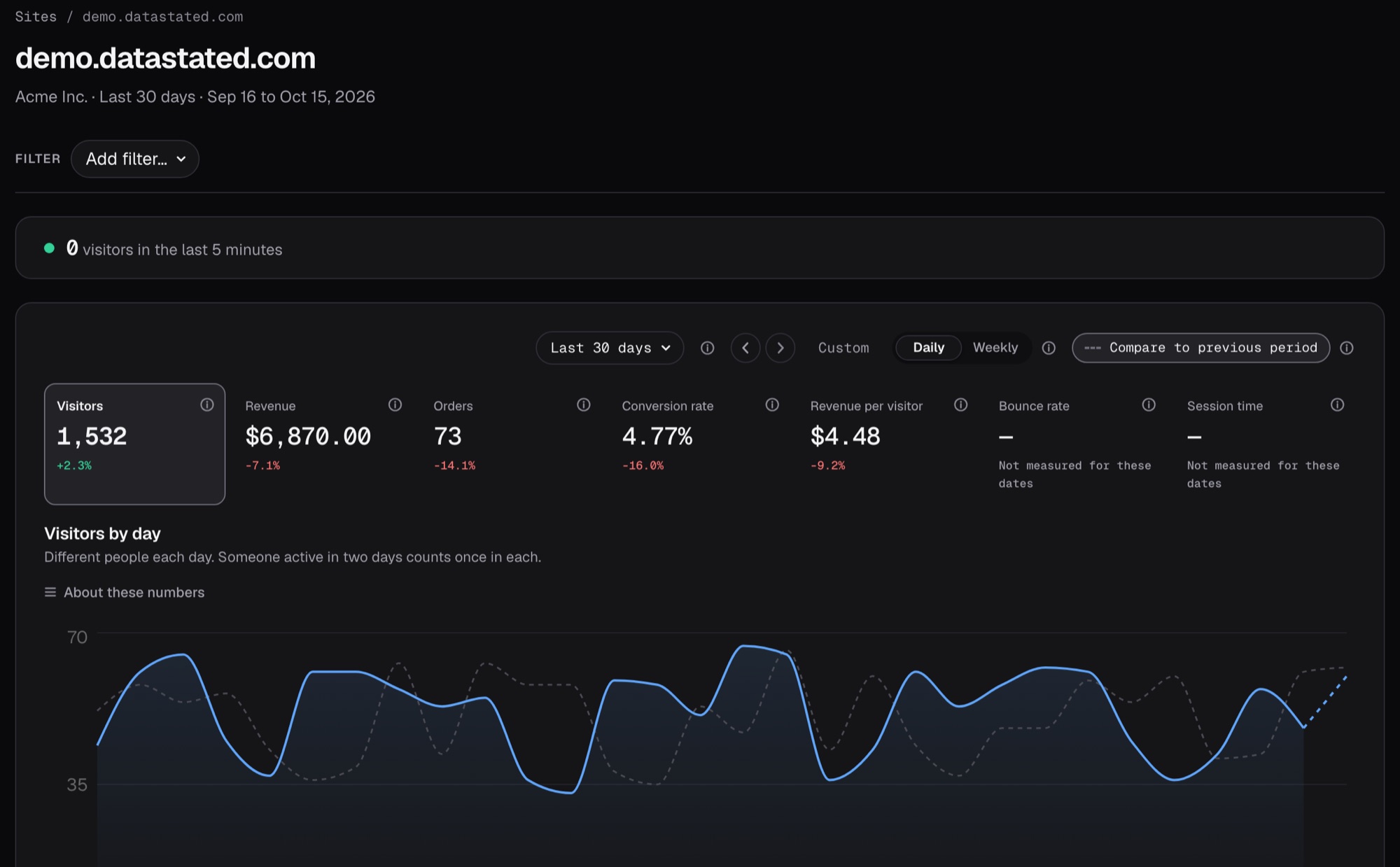
Every sale, traced to where it came from.
Watch visitors arrive from every channel, and see which ones turn into real money.
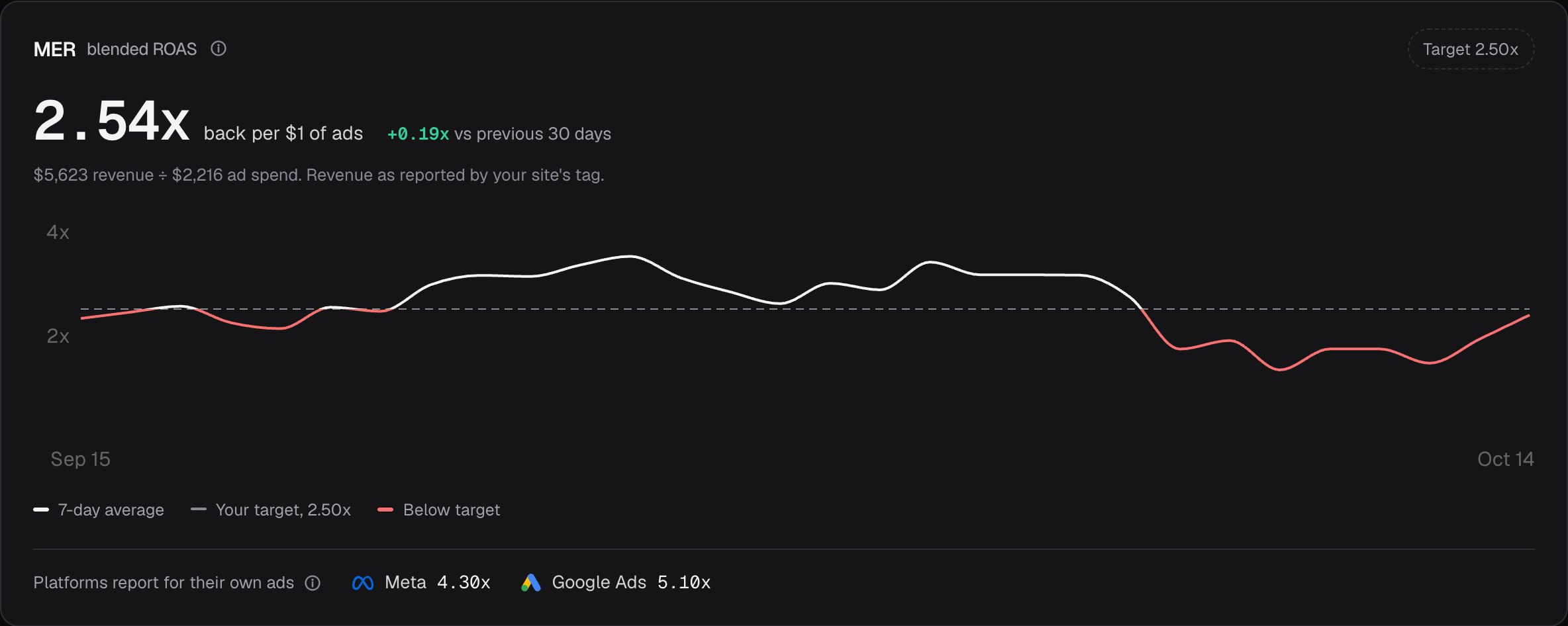
Ad platforms grade their own homework.
Meta and Google often take credit for the same sale, so your ads look better than they are. DataStated counts each sale once, so you know what your ad money really earns.
1 salefrom Meta
1 salefrom Google
2 salesin your reports
1 saleyou actually made
Order #1043
$64.00 Paid with Stripe
- Meta AdsCounts it as its sale
- Google AdsCounts it as its sale
- Your revenueCounts it once
One sale, two platforms taking credit. Example order.
Just ask your AI assistant.
Ask Claude or Cursor about your sales, ads or traffic and get answers from your real numbers, without opening a dashboard. It changes nothing unless you allow it.
How did Meta really do this week?
Meta says 41 sales and $3,807 this week.
Your store got 17 orders worth $1,536 from Meta ads, so Meta is taking credit for sales other channels brought in.
Your best source this week was Google search: 14 orders and $1,021 with no ad spend.
Example conversation with example data
-
See your visitors today.
Add one line to any website, or install the Shopify app, and visitors show up right away.
Install the tag
<script defer src="https://app.datastated.com/ds.js"
  data-site="yourstore.com"></script>
Tag found on yourstore.comchecked just nowFirst visit recorded/products/linen-shirt -
Know every dollar is real.
Connect Stripe or Shopify, and every sales number is money you actually collected, refunds included.
Revenue
StripeConnected412 payments in 30 daysShopifyConnectedorders and refundsRefunds come off the day they happen.
-
See what your ads really earned.
Connect Meta and Google to see what they claim next to the sales you really made. We never touch your campaigns.
Ad platforms
Meta AdsConnectedRead-onlyGoogle AdsConnectedRead-onlySpend, clicks and the sales each platform claims, updated every few hours.
-
Spend more on what works.
See which channels really pay for themselves and move your budget there, instead of going on gut feel.
Try it on a real dashboard first.
Click around a full example store before you add your own.
See the live demoEverything you need to grow.
- Find the customers ChatGPT sends youSee shoppers who found you through ChatGPT and other AI assistants.
- See which ads your sales came fromVisitors from your Meta and Google ads are spotted for you, no setup needed.
- See the money next to every sourceEvery traffic source shows the sales it brought in.
Traffic sources
Last 30 daysAsk about this site
How did Meta really do this week?4 people can see this site
Copy as API call
GET /api/sites/yourstore.com/breakdowns- Ask your numbers anythingType a question in plain English, or ask your AI assistant.
- Bring your whole team, freeInvite as many people as you like. A freelancer only sees the store they work on.
- Use your numbers anywherePull them into your own tools and reports, on every plan.
Pay for traffic, never features.
Every plan includes everything. Pick the size that fits your traffic and change it any time.
$29a month
Up to 100,000 pageviews and orders a month, on up to 5 sites, with 3 years of history.
Start free on 100k14 days free, no card needed.
Careful with your data.
- Visitors stay anonymous. We never store raw IP addresses, and the tag respects your visitors' browser privacy settings.
- Your ad accounts stay untouched. Meta and Google connections only read reports and never change your campaigns.
- Your numbers stay yours. Pull them out through the API on any plan, or ask us for a full copy.
Why this exists
I run online stores and I build software. For years I paid Meta and Google for ads, and every month each one told me how much money it made me. Added together, they claimed more sales than my payment processor had ever seen. The tool that's supposed to settle this is Google Analytics, and Google also sells me the ads.
So I built the tool I wanted. DataStated starts from the money you actually collected and checks every ad platform's report against it.
It's a small product and I'm the one answering the inbox. If it ever tells you something about your money that isn't true, email me at hello@datastated.com.
Richard, founder of DataStated
Questions, answered plainly.
Any website, plus Shopify, Stripe and Meta Ads. Sales are reported in US dollars for now.
Yes: 14 days with every feature, and no card needed. If you subscribe early, your first charge still waits until day 15.
No. Setup is copy and paste, and on Shopify the app does it for you. If someone else runs your site, send them the setup guide.
Each pageview, order and goal counts, and all your sites share one monthly allowance. If you go over, nothing breaks: we keep recording, and upgrading shows you everything we caught.
No. DataStated works on its own, and it runs fine next to Google Analytics if you want to compare the two.
We never store your visitors' IP addresses, and we respect their browser's privacy settings. You still need your own privacy notice, and the consent guide shows how.
Start your 14-day free trial.
No card needed. Add your site and your first visitors show up right away.
Opens sign-up with your site filled in.